Remote Access Trojan Warning Signs and Immediate Response Steps
Most remote access trojans hide in plain sight by mimicking legitimate system processes and using standard administrative tools to avoid detection.
Look for unexpected resource usage, disabled security controls, and new admin accounts. Isolate the device immediately, preserve memory for analysis, and assume the attacker has lateral access. Do not rely on simple reboots to clear the infection.
Recognizing Immediate Remote Access Trojan Indicators
Remote access trojans create immediate friction on the system. You notice these signs because the malware consumes resources or alters user settings. High CPU or disk usage without a clear application cause is a primary indicator. The system slows down during routine tasks. Network traffic spikes when no large downloads are running.
Visual anomalies appear on the desktop. The mouse cursor moves independently. Windows open and close without input. These actions suggest an interactive session. The attacker is exploring the environment. You may see new icons on the desktop. These shortcuts often lead to malicious scripts. The system clock may change unexpectedly. This disrupts time-sensitive security logs.
Subtle Remote Access Trojan Behaviors
Some remote access trojans operate quietly. They avoid consuming significant resources. You miss these signs because they mimic normal behavior. Legitimate system processes often host the malicious code. This technique is known as process injection. The malware runs inside a trusted executable. Standard task managers show only the trusted process.
Network connections appear benign. The malware uses common ports like 443 for HTTPS. This blends with normal web traffic. The connection duration may be irregular. It connects only when the attacker is active. You see no constant data stream. The malware may disable screen savers. This prevents the system from locking. It keeps the session active for longer periods.
Understanding Attack Persistence Mechanisms
Persistence ensures the remote access trojan survives reboots. The attacker modifies system startup parameters. Registry keys store the malware path. The system launches the malware automatically. Scheduled tasks create recurring execution windows. The attacker sets a task to run at login. This bypasses some security checks.
Service creation is another method. The malware installs itself as a system service. Services run with high privileges. They start before user login. This gives the attacker early access. You must check service properties carefully. Look for unusual paths or descriptions. Legitimate services have clear names. Malicious services often use random characters.
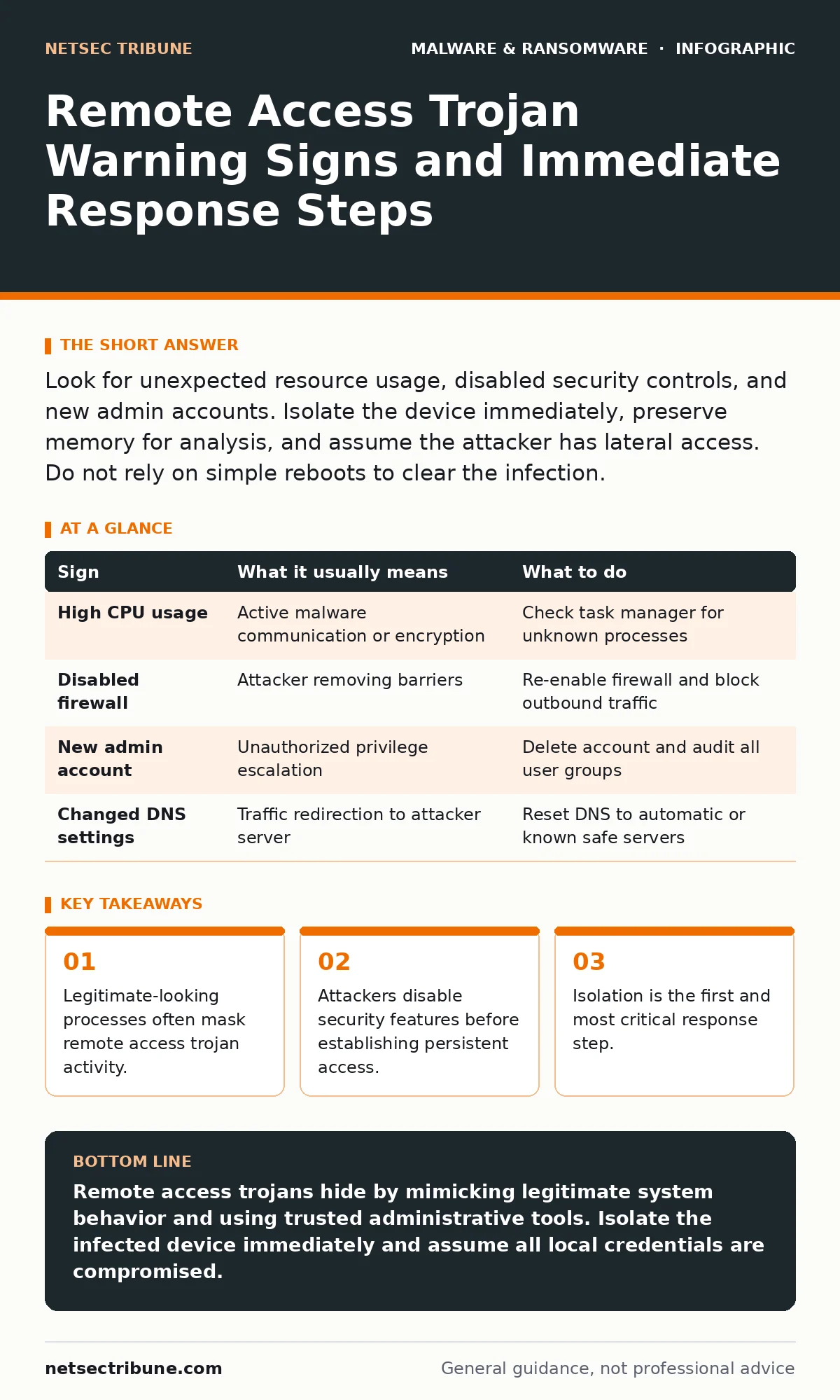
| Sign | What it usually means | What to do |
|---|---|---|
| High CPU usage | Active malware communication or encryption | Check task manager for unknown processes |
| Disabled firewall | Attacker removing barriers | Re-enable firewall and block outbound traffic |
| New admin account | Unauthorized privilege escalation | Delete account and audit all user groups |
| Changed DNS settings | Traffic redirection to attacker server | Reset DNS to automatic or known safe servers |
The Hidden Cost of Standard Tools
Attackers use legitimate administrative tools. This is called living off the land. They use PowerShell for remote commands. They use WMI for system queries. These tools are trusted by default. Security software often allows them. This makes detection difficult. You cannot simply block these tools. They are required for system management.
You must monitor the usage of these tools. Look for unusual arguments. Check for encoded commands. Normal scripts use clear text. Malicious scripts use base64 encoding. This hides the true intent. You need advanced logging to catch this. Standard event logs may not capture the details.
Immediate Response to Suspected Infection
Isolate the device from the network. Disconnect the Ethernet cable. Disable Wi-Fi immediately. This stops data exfiltration. It prevents lateral movement. Do not shut down the device. Powering off destroys memory evidence. The malware may be running in RAM. This data is critical for analysis. Keep the device running in isolation.
Document what you see. Take screenshots of error messages. Note the time of the first sign. Record any unusual network connections. This information helps forensic analysis. Do not run antivirus scans yet. Some malware detects scanning software. It may delete itself or encrypt files. See the guide on ransomware backups for data preservation strategies.
See also: Decoding Ransom Notes: Evidence Handling and Negotiation Realities · Botnets: How Command and Control Networks Operate and Persist
Analyzing the Scope of Compromise
Assume the attacker has moved laterally. Remote access trojans are often a foothold. The attacker uses the initial access to explore. They look for other systems. They steal credentials from memory. They map the network topology. You must check other devices on the same subnet. Look for similar signs on other machines.
Review authentication logs. Look for failed login attempts. These indicate credential stuffing. Check for successful logins from unusual locations. This suggests stolen credentials. You must reset passwords for all users. Use strong, unique passwords. Enable multi-factor authentication. This limits the value of stolen credentials.
Long-Term Mitigation Strategies
Prevent future remote access trojan infections. Update all software regularly. Patch known vulnerabilities. Use application whitelisting. This allows only approved programs to run. It blocks unknown executables. Restrict administrative privileges. Users should not have admin rights. This limits the damage of an infection.
Monitor network traffic for anomalies. Use deep packet inspection. Look for unusual protocols. Check for data exfiltration patterns. Implement endpoint detection and response. This provides real-time visibility. It alerts you to suspicious behavior. See the guide on sandbox evasion for advanced detection techniques. These tools help identify fileless malware.
Understanding Related Threat Vectors
Remote access trojans often work with other malware. They may install keyloggers. These capture keystrokes and passwords. They may join botnets. This provides distributed computing power. They may deploy computer worms. These spread to other systems. Understanding these relationships helps in detection. Look for multiple types of malicious activity.
Spyware often accompanies remote access trojans. It monitors user activity. It takes screenshots. It records video. This combination provides full access. You must treat any remote access trojan as a total compromise. Assume all data on the device is exposed. Plan for complete system rebuilds. See the guide on tamper protection for kernel-level defense.
Key takeaways
- Legitimate-looking processes often mask remote access trojan activity.
- Attackers disable security features before establishing persistent access.
- Isolation is the first and most critical response step.
Remote access trojans hide by mimicking legitimate system behavior and using trusted administrative tools. Isolate the infected device immediately and assume all local credentials are compromised.
Frequently asked questions
How do I know if a remote access trojan is still active?
Check for persistent network connections and unusual process parent-child relationships. Look for scheduled tasks that run at irregular intervals.
Can antivirus software detect all remote access trojans?
No. Many remote access trojans use fileless techniques or living off the land methods. They avoid signature-based detection.
Should I format the hard drive after infection?
Yes. Rebuilding the operating system is the safest option. Restore data from clean backups only after verifying their integrity.
Do remote access trojans always steal data?
Not always. Some are used for espionage. Others are used for cryptocurrency mining. The intent depends on the attacker's goals.
How this guide was produced: written by the NetSec Tribune editorial team with AI assistance, checked against the public references listed below, and reviewed when the facts change. See our editorial policy or report an error.