Email Encryption for Small Businesses: Practical Implementation
Encrypting email subjects prevents metadata leaks that reveal business intent, even when the message body remains secret.
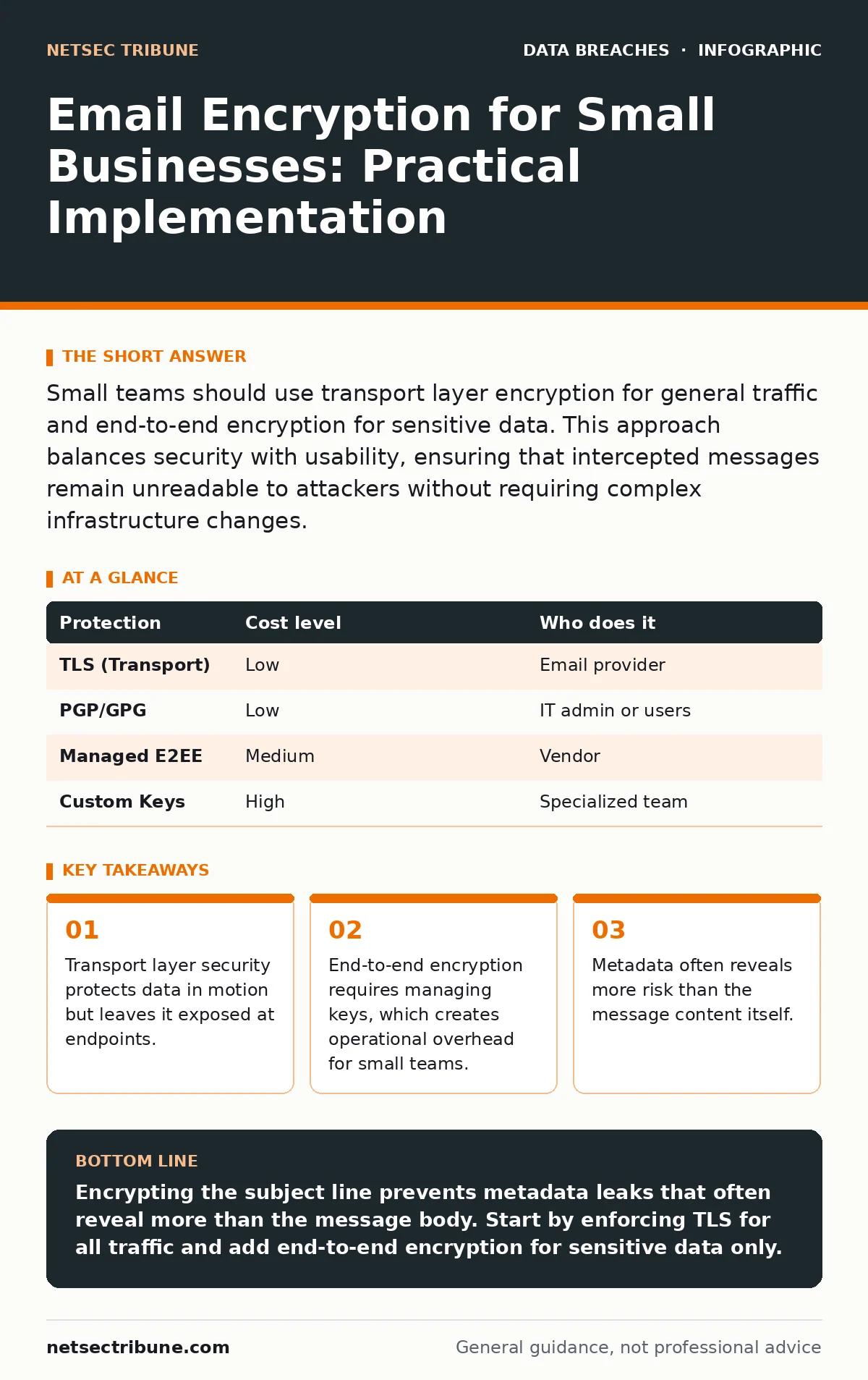
Small teams should use transport layer encryption for general traffic and end-to-end encryption for sensitive data. This approach balances security with usability, ensuring that intercepted messages remain unreadable to attackers without requiring complex infrastructure changes.
The Scale of the Exposure
Small organizations often believe they are too insignificant to target. This assumption fails because automated tools scrape the internet for unencrypted data regardless of the sender's size. When you send an email, it traverses multiple servers before reaching the recipient. Each hop is a potential interception point.
If you do not encrypt the connection, the data travels as plain text. An attacker on the same network can read it. This is not theoretical; it is the default state of the internet. For a small team, a single leaked contract or credential set can end the business.
You must distinguish between two types of protection. Transport layer encryption secures the pipe between servers. End-to-end encryption secures the message itself. Most providers offer the former by default. You must actively implement the latter for sensitive communications.
Transport Layer Security Mechanics
Transport Layer Security, or TLS, encrypts the connection between email servers. When you send a message, your client connects to the outgoing server via TLS. That server then connects to the recipient's server, also via TLS. This protects the data while it moves across the internet.
This method is affordable and often free. Most modern email providers enable it automatically. However, it has a critical flaw: the data is decrypted at each server. If an attacker compromises the email provider or the final recipient's server, they can read the message.
TLS does not protect against insider threats. An administrator with access to the mail server can read all emails. It also does not protect the data once it sits in the recipient's inbox. For small businesses, this is usually sufficient for general correspondence. It is not enough for legal, medical, or financial data.
End-to-End Encryption Trade-offs
End-to-end encryption, or E2EE, ensures that only the sender and recipient can read the message. The encryption happens on the user's device before the message leaves it. The keys required to decrypt the message never touch the email server.
This provides stronger security but introduces friction. Users must manage encryption keys. If a user loses their private key, the message is unrecoverable. Small teams often lack the technical expertise to handle key management. This creates a hidden cost: lost productivity and support tickets.
You can mitigate this by using managed solutions. Some platforms handle key generation and storage automatically. This shifts the trust from your team to the vendor. You must verify that the vendor cannot read your messages. Look for zero-knowledge architectures where the provider never holds the decryption keys.
| Protection | Cost level | Who does it |
|---|---|---|
| TLS (Transport) | Low | Email provider |
| PGP/GPG | Low | IT admin or users |
| Managed E2EE | Medium | Vendor |
| Custom Keys | High | Specialized team |
Metadata and Subject Lines
Many teams encrypt the body of the email but leave the subject line plain. This is a common mistake. The subject line often contains more sensitive information than the body. An attacker can see who you are talking to and what the topic is.
Some encryption tools allow you to encrypt the subject line. You should use this feature for sensitive communications. However, encrypted subject lines look suspicious. They appear as random characters or generic placeholders. This can trigger spam filters or cause the recipient to ignore the message.
You must balance security with deliverability. If your emails are marked as spam, the encryption fails its purpose. Use clear, generic subject lines for encrypted messages. Include context inside the body. For example, use "Update" as the subject and explain the details in the encrypted text.
Delegating Key Management
Small teams should not manage encryption keys manually. The risk of loss is too high. When an employee leaves, you must revoke their access and transfer their keys. If you do not have a process, the data becomes inaccessible.
Delegate this task to a managed service provider. They handle key rotation, recovery, and revocation. You pay a monthly fee for this convenience. This is cheaper than hiring a dedicated security engineer. It is also more reliable than asking your accounting manager to manage crypto keys.
Ensure the provider complies with relevant standards. They must not store your private keys in a way that allows them to read your emails. Verify this by reading their security white papers. Do not accept vague promises. Ask for technical details about their key storage and access controls.
See also: Tenant Isolation for Small Business: Practical Cloud Security Steps · CIA Triad Security: How Confidentiality, Integrity and Availability Protect Data
Questions for Your IT Provider
Before choosing a solution, ask your IT provider specific questions. Do not accept generic answers. You need to know how they handle the edge cases.
- How do you handle key recovery if an employee leaves suddenly?
- Can you guarantee that the vendor cannot read our emails?
- What happens if the encryption server goes offline?
- Do you support encryption for mobile devices and web clients?
- How do you handle legacy emails that were not encrypted?
Integration with Existing Security
Email encryption works best when combined with other controls. It does not replace the need for strong authentication. If an attacker steals a user's credentials, they can read encrypted emails after decryption. You must protect the login process.
See our guide on unauthorized access for methods to secure login credentials. Multi-factor authentication adds a layer of protection that encryption alone cannot provide. If you combine both, you significantly reduce the risk of compromise.
Also, consider how encrypted emails fit into your incident response. If you suspect a breach, you need to know if encrypted data was exfiltrated. See our guide on data exfiltration to understand how attackers move data. Encrypted emails may appear as large, unusual attachments to an untrained observer.
The Human Element
Technology fails if people do not use it correctly. You must train your team on when to use encryption. Not every email needs to be encrypted. Overuse leads to fatigue. Users will start bypassing the system to save time.
Define clear policies. Mark sensitive emails with a specific tag or use a separate button for encryption. Make it easy to do the right thing. If encryption takes three clicks instead of one, people will find a workaround.
See our guide on social engineering to understand how attackers trick users into bypassing security. An attacker may impersonate a colleague and ask for unencrypted data. Train your team to recognize these requests. Encourage them to question unusual demands for sensitive information.
Conclusion of Implementation
Implementing email encryption is a process, not a one-time fix. Start with transport layer security to protect data in motion. Then, identify the data that needs end-to-end protection. Implement that next.
Do not try to encrypt everything at once. Focus on high-risk communications. Measure the impact on productivity. Adjust your policies as you learn what works. Security is a balance between protection and usability. Find the point where your team feels safe but not hindered.
See our guide on incident communication plans to prepare for when things go wrong. Even with encryption, mistakes happen. Having a plan ensures you can respond quickly and effectively.
Key takeaways
- Transport layer security protects data in motion but leaves it exposed at endpoints.
- End-to-end encryption requires managing keys, which creates operational overhead for small teams.
- Metadata often reveals more risk than the message content itself.
Encrypting the subject line prevents metadata leaks that often reveal more than the message body. Start by enforcing TLS for all traffic and add end-to-end encryption for sensitive data only.
Frequently asked questions
Does email encryption protect against viruses?
No, encryption hides the content but does not scan it. Malicious files remain encrypted and can still execute when opened by the recipient. You need separate anti-malware tools.
Can encrypted emails be searched?
Standard search tools cannot read encrypted content. You may need specialized indexing tools that decrypt messages on the fly, which requires careful key management.
Is free email encryption enough?
Free tools often lack key management and audit logs. For small businesses, the cost of lost data usually exceeds the price of a managed service.
What happens if I lose my encryption key?
The data is permanently inaccessible. This is why managed key recovery services are critical for business continuity.
How this guide was produced: written by the NetSec Tribune editorial team with AI assistance, checked against the public references listed below, and reviewed when the facts change. See our editorial policy or report an error.