Computer Worms: How Self-Replicating Code Bypasses Small Business Defenses
Self-replicating code moves laterally through network shares, ignoring user interaction and bypassing standard endpoint controls that rely on human error.
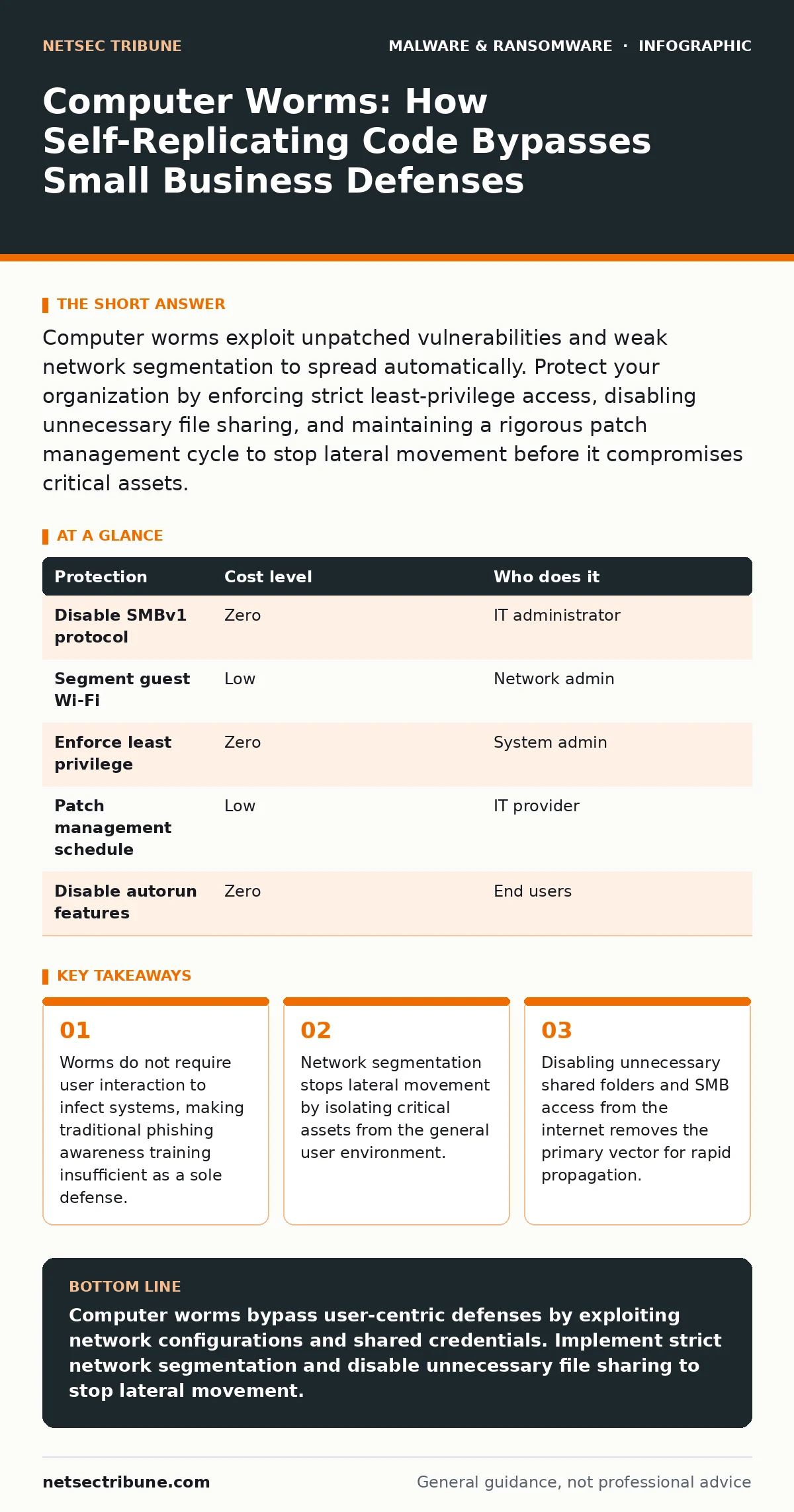
Computer worms exploit unpatched vulnerabilities and weak network segmentation to spread automatically. Protect your organization by enforcing strict least-privilege access, disabling unnecessary file sharing, and maintaining a rigorous patch management cycle to stop lateral movement before it compromises critical assets.
The Mechanics of Autonomous Propagation
Computer worms differ fundamentally from other malware because they do not need a human to execute them. A worm is a standalone program that replicates itself to spread to other computers. It scans for vulnerabilities in network services or shared resources. Once it finds an entry point, it installs a copy of itself and repeats the process. This autonomy allows the infection to grow exponentially without any user clicking a link or opening an attachment.
This behavior creates a specific risk profile for small organizations. Large enterprises often have segmented networks that limit how far a breach can spread. Small businesses typically operate on flat networks where every device can communicate with every other device. This convenience creates a highway for lateral movement. The worm does not care about your organizational chart; it follows the path of least resistance through open ports and shared credentials.
Why Small Organizations Remain Exposed
The primary exposure for small teams is not a lack of tools, but a lack of configuration discipline. Many small organizations run default settings on their routers and file servers. These defaults often allow remote administration or file sharing from the internet. A worm exploits these open doors to enter the network. It then uses the credentials of the first compromised machine to access other systems.
Another hidden risk is the reliance on cloud storage without proper access controls. When employees sync files to a shared cloud drive, they effectively extend the local network into the cloud. If the worm compromises a local machine, it can upload malicious payloads to the cloud storage. Other users who sync those files then download the infection to their devices. This turns the cloud into an amplification vector rather than a backup solution.
The Hidden Cost of Shared Credentials
Small teams often share administrative passwords to simplify collaboration. This practice is the single greatest accelerant for worm propagation. If a worm gains access to one machine with administrative rights, it can access every other machine on the domain. It does not need to guess passwords; it simply uses the token from the first victim.
This creates a domino effect that is difficult to stop once it starts. The worm moves faster than any manual intervention. By the time an alert is triggered, the infection may have already replicated to every reachable endpoint. The cost here is not just data loss, but the operational paralysis that follows. You cannot trust any system that has communicated with the infected host during the infection window.
Low-Cost Protections That Actually Work
You do not need expensive security appliances to stop worms. The most effective defenses are configuration changes that reduce the attack surface. These measures cost nothing in software but require discipline to implement. They focus on limiting where the worm can go and how it can move.
| Protection | Cost level | Who does it |
|---|---|---|
| Disable SMBv1 protocol | Zero | IT administrator |
| Segment guest Wi-Fi | Low | Network admin |
| Enforce least privilege | Zero | System admin |
| Patch management schedule | Low | IT provider |
| Disable autorun features | Zero | End users |
Disabling outdated protocols like SMBv1 removes a common vector for older worms. Segmenting the guest Wi-Fi ensures that visitors cannot access internal file shares. Enforcing least privilege means that standard users cannot install software or modify system settings. This limits the worm’s ability to establish persistence.
What to Ask Your IT Provider
If you outsource your IT support, you must verify that they are actively managing these risks. Many providers focus on keeping systems running rather than securing them. You need to ask specific questions about their approach to lateral movement prevention. Do not accept vague answers about "firewalls" or "antivirus."
- How do you segment the network to limit lateral movement between workstations and servers?
- What is your process for verifying that all operating systems and third-party applications are patched within a specific timeframe?
- Do you monitor for unusual outbound traffic that might indicate a worm scanning for new targets?
- How do you handle shared credentials, and do you enforce multi-factor authentication for all administrative access?
- Can you demonstrate a test of your incident response plan for a self-replicating threat?
These questions force the provider to move beyond generic security claims. They reveal whether the provider understands the mechanics of worm propagation. A provider who cannot answer these specifics is likely relying on perimeter defenses that worms easily bypass.
See also: Lateral Movement in Cybersecurity: Definition and Detection · DDoS Protection Explained: How Traffic Shaping Stops Floods
The Limits of Traditional Endpoint Security
Traditional antivirus software often fails against worms because it relies on signature detection. Worms can modify their code slightly to evade these signatures. This is related to polymorphic malware, which changes its appearance while retaining its function. Even if the endpoint protection catches the initial infection, it may not stop the replication process in time.
This is why sandboxing is a useful concept to understand. Sandboxing involves running suspicious code in an isolated environment. However, many worms are designed for sandbox evasion, detecting when they are being analyzed and changing their behavior. Relying solely on automated analysis tools creates a false sense of security. You must assume that some code will bypass these checks.
Configuration as the Primary Defense
The most reliable defense against worms is a hardened configuration. This means turning off everything you do not need. Disable file sharing on devices that do not require it. Block unnecessary ports on your firewall. Ensure that remote desktop protocols are not exposed to the internet. These steps reduce the number of entry points the worm can exploit.
You should also review your backup strategy. Backups must be offline or immutable to prevent worms from encrypting them. If the worm can reach your backup drive, your recovery plan fails. This is similar to the risks associated with trojanized software, where the malicious code hides within legitimate updates. Ensure your backups are isolated from the primary network.
Monitoring for Unusual Activity
Worms create noise as they scan for new targets. This scanning activity generates a high volume of connection attempts. Your firewall logs should show this pattern. If you see a single machine attempting to connect to many other internal IP addresses, it is likely infected.
Set up alerts for these patterns. Most modern firewalls can detect port scanning behavior. Configure them to block the source IP automatically. This containment step buys you time to isolate the infected machine. Without this monitoring, you may not realize the extent of the infection until performance degrades significantly.
Key takeaways
- Worms do not require user interaction to infect systems, making traditional phishing awareness training insufficient as a sole defense.
- Network segmentation stops lateral movement by isolating critical assets from the general user environment.
- Disabling unnecessary shared folders and SMB access from the internet removes the primary vector for rapid propagation.
Computer worms bypass user-centric defenses by exploiting network configurations and shared credentials. Implement strict network segmentation and disable unnecessary file sharing to stop lateral movement.
Frequently asked questions
Can a computer worm delete files automatically?
Yes, some worms are designed to delete system files or encrypt data, causing significant operational disruption and data loss.
Do firewalls stop computer worms?
Firewalls can block external worms from entering, but they cannot stop a worm that has already entered the internal network from spreading laterally.
How fast can a worm spread?
In a flat network with shared credentials, a worm can infect all connected devices in minutes.
Is multi-factor authentication effective against worms?
MFA protects against credential theft but does not stop worms that exploit software vulnerabilities or shared network resources.
How this guide was produced: written by the NetSec Tribune editorial team with AI assistance, checked against the public references listed below, and reviewed when the facts change. See our editorial policy or report an error.