Stop Session Hijacking: Low-Cost Defenses for Small Teams
Session cookies are often the only key attackers need, making token binding and strict domain policies more effective than complex firewalls for small teams.
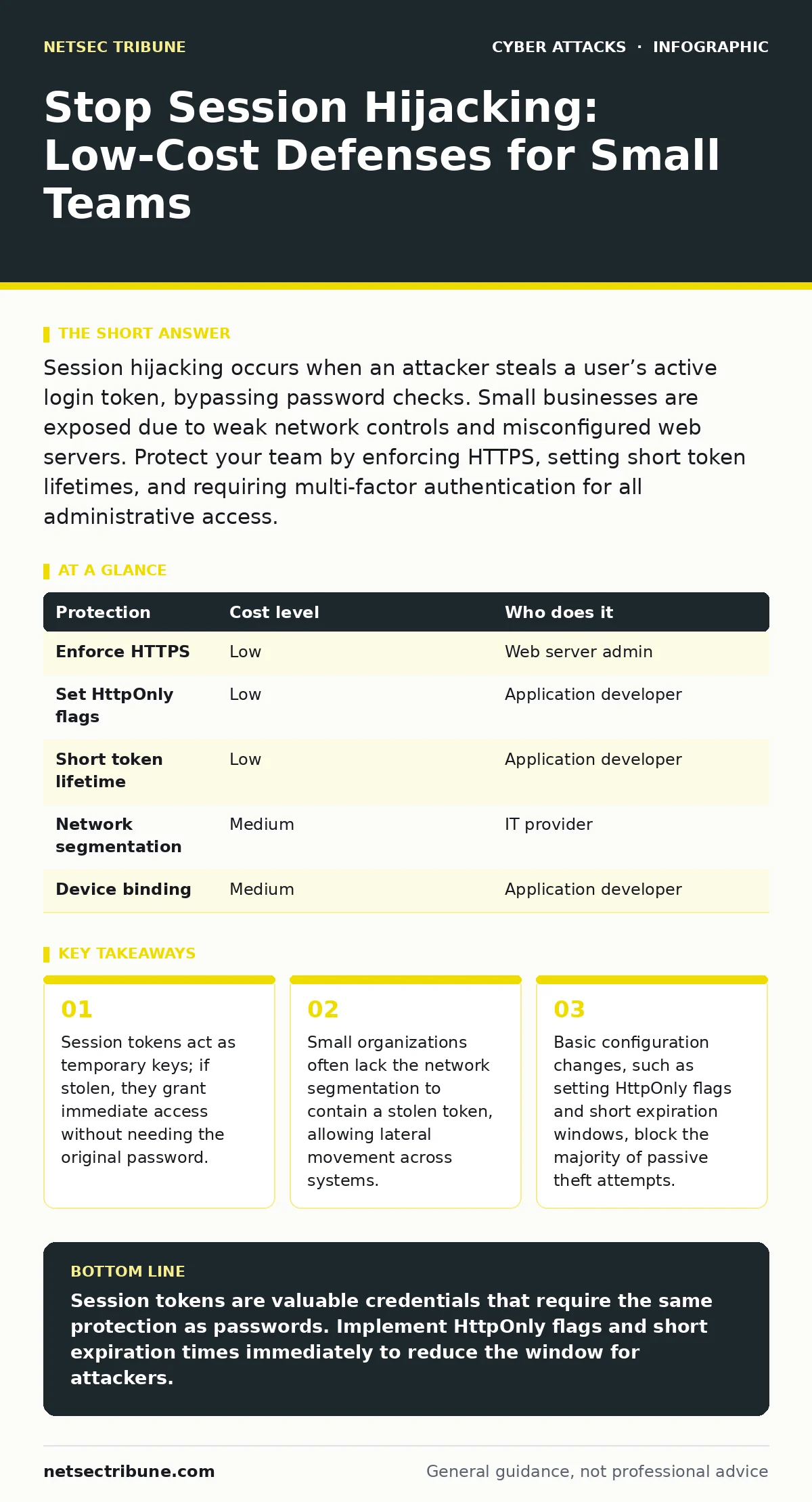
Session hijacking occurs when an attacker steals a user’s active login token, bypassing password checks. Small businesses are exposed due to weak network controls and misconfigured web servers. Protect your team by enforcing HTTPS, setting short token lifetimes, and requiring multi-factor authentication for all administrative access.
The Mechanics of Token Theft
Session hijacking exploits the stateless nature of the web. When you log into a website, the server creates a unique identifier called a session token. This token is stored in your browser and sent with every request to prove your identity. The server does not check your password again; it trusts the token. If an attacker obtains this token, they impersonate you perfectly. The system sees a valid token and grants access, just as it would for you.
This method bypasses most traditional defenses. Multi-factor authentication verifies your identity at login, but it does not verify the user during the session. Once the token is issued, the authentication layer steps back. The session becomes a free pass. Attackers do not need to crack your password. They only need to intercept the token in transit or steal it from your device.
Why Small Teams Are Exposed
Small organizations often operate with a flat network architecture. There is little separation between guest devices, employee laptops, and administrative servers. This lack of segmentation means that a compromised device can easily reach sensitive internal resources. Large enterprises use complex intrusion detection systems, but small teams often rely on basic perimeter firewalls that do not inspect internal traffic.
Budget constraints also lead to deferred maintenance. Web applications may run on outdated frameworks with known vulnerabilities. These flaws allow attackers to inject malicious code that steals session cookies directly from the browser. This technique, known as cross-site scripting, does not require network interception. It runs inside the victim’s browser, sending the token to the attacker’s server. Small teams often lack the resources to patch these applications immediately, leaving them open for weeks or months.
The Hidden Cost of Passive Attacks
The most dangerous aspect of session hijacking is its stealth. Unlike a brute-force attack, which generates multiple failed login attempts, a stolen token looks like legitimate activity. The IP address might change, but the behavior remains normal. Security tools often ignore this because they are tuned to detect anomalies in volume, not in identity validity.
This creates a blind spot in monitoring. You may see a user accessing files from a new location, but without strict geographic or device binding, the system accepts the request. The attacker can move laterally, accessing databases or customer records without triggering alarms. By the time the legitimate user logs in and gets locked out, the damage is done. The session has already served its purpose.
Low-Cost Technical Controls
You do not need expensive hardware to mitigate these risks. Most protections involve configuration changes to your web server and application code. The first step is to enforce HTTPS everywhere. Hypertext Transfer Protocol Secure encrypts the data between the browser and the server. This prevents attackers on the same Wi-Fi network from reading the session token in plain text.
Next, configure your session cookies with specific flags. The HttpOnly flag prevents JavaScript from accessing the cookie. This stops cross-site scripting attacks from stealing the token. The Secure flag ensures the cookie is only sent over encrypted connections. The SameSite attribute restricts how cookies are sent with cross-site requests, reducing the risk of cross-site request forgery.
| Protection | Cost level | Who does it |
|---|---|---|
| Enforce HTTPS | Low | Web server admin |
| Set HttpOnly flags | Low | Application developer |
| Short token lifetime | Low | Application developer |
| Network segmentation | Medium | IT provider |
| Device binding | Medium | Application developer |
Shortening the token lifetime is another effective measure. If a token expires after thirty minutes, the attacker has a very small window to use it. This limits the damage even if the token is stolen. You can extend the session with a refresh token mechanism, which requires a secondary check to issue a new access token.
Binding Sessions to Context
Standard session management relies solely on the token value. This is insufficient because the token is a single point of failure. You can add context to the session by binding it to the user’s IP address or user-agent string. The user-agent string identifies the browser and operating system. If the token is presented from a different browser or IP address, the server rejects it.
This adds a layer of friction for attackers. If they steal a token, they must also mimic the original device’s characteristics. This is difficult to do at scale. However, this method can cause issues for users with dynamic IP addresses, such as those on mobile networks. You must balance security with usability. A strict IP binding may lock out legitimate users who switch between Wi-Fi and cellular data.
What to Ask Your IT Provider
If you outsource your IT, you must verify that session security is part of their baseline. Many providers focus on virus protection and backup, ignoring application-level security. You need to ask specific questions to ensure your web applications are configured correctly.
Do not accept vague answers about "standard security." Ask for the specific configurations. If they cannot explain how they set cookie flags, they are likely not doing it. You also need to know how they handle updates. Unpatched software is a primary vector for token theft.
- How do you configure session cookies on our web applications?
- Do you enforce HttpOnly and Secure flags on all session tokens?
- What is the default expiration time for our user sessions?
- How do you monitor for anomalous session activity, such as impossible travel?
- Do you perform regular scans for cross-site scripting vulnerabilities?
Integrating with Broader Defenses
Session hijacking often follows other attacks. An attacker might use social engineering to trick a user into visiting a malicious site. That site then steals the token. Understanding social engineering red flags helps your team avoid these initial traps. Similarly, if your API endpoints are poorly secured, an attacker might abuse them to manipulate session states. Reviewing your API abuse protections can close this gap.
You should also consider the impact of DDoS attacks on your session infrastructure. A denial of service can overwhelm your server, causing it to drop or reset sessions. This can create opportunities for attackers to inject their own tokens into the chaos. Ensure your infrastructure can handle traffic spikes without compromising session integrity.
Key takeaways
- Session tokens act as temporary keys; if stolen, they grant immediate access without needing the original password.
- Small organizations often lack the network segmentation to contain a stolen token, allowing lateral movement across systems.
- Basic configuration changes, such as setting HttpOnly flags and short expiration windows, block the majority of passive theft attempts.
Session tokens are valuable credentials that require the same protection as passwords. Implement HttpOnly flags and short expiration times immediately to reduce the window for attackers.
Frequently asked questions
Can a firewall stop session hijacking?
A firewall filters network traffic but cannot inspect the validity of a session token inside encrypted data. It blocks unauthorized IP access but not stolen credentials.
Is multi-factor authentication enough?
No. MFA protects the initial login. Once the session is established, MFA is no longer involved. The session token becomes the sole key to the account.
How do I know if my session is hijacked?
Look for unexpected lockouts or activity from unknown locations. If you cannot log in because someone else is using your session, the token has likely been stolen.
What is the difference between a session cookie and a persistent cookie?
A session cookie is deleted when the browser closes. A persistent cookie remains on the device for a set period. Persistent cookies are easier for malware to steal.
How this guide was produced: written by the NetSec Tribune editorial team with AI assistance, checked against the public references listed below, and reviewed when the facts change. See our editorial policy or report an error.